
js的防抖和节流
B站视频教程: JS_防抖_节流
防抖
搜索框带来的问题
需求:根据输入框内容来请求数据
<!DOCTYPE html>
<html lang="en">
<head>
    <meta charset="UTF-8">
    <meta http-equiv="X-UA-Compatible" content="IE=edge">
    <meta name="viewport" content="width=device-width, initial-scale=1.0">
    <title>Document</title>
</head>
<body>
    <input id="searchTxt" type="search" placeholder="请输入关键字检索">
    <script>
        document.querySelector("#searchTxt").oninput = function(){
            console.log('发送请求,当前输入框值:',this.value)
        }
    </script>
</body>
</html>
上面的代码会带来一个问题:用户每输入一个关键字都会触发
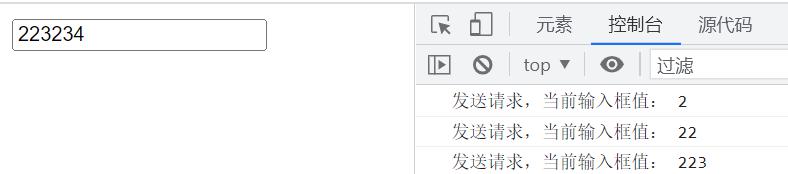
现在是要求是用户停下来不输入的时候再触发一次,这个时候就需要用到防抖函数了
实现的思路
- 事件函数执行,先创建个定时器
- 把逻辑代码放到定时器中
- 当函数再次触发,清除定时器
- 创建一个新定时器即可
案例
<!DOCTYPE html>
<html lang="en">
<head>
    <meta charset="UTF-8">
    <meta http-equiv="X-UA-Compatible" content="IE=edge">
    <meta name="viewport" content="width=device-width, initial-scale=1.0">
    <title>Document</title>
</head>
<body>
    <input id="searchTxt" type="search" placeholder="请输入关键字检索">
    <script>
        let t = null
        document.querySelector("#searchTxt").oninput = function(){
            clearTimeout(t) //有定时器则清除
            t = setTimeout(() => {
                console.log('发送请求,当前输入框值:',this.value)
            }, 1000);
        }
    </script>
</body>
</html>

封装防抖函数
<!DOCTYPE html>
<html lang="en">
<head>
    <meta charset="UTF-8">
    <meta http-equiv="X-UA-Compatible" content="IE=edge">
    <meta name="viewport" content="width=device-width, initial-scale=1.0">
    <title>Document</title>
</head>
<body>
    <input id="searchTxt" type="search" placeholder="请输入关键字检索">
    <script>
        document.querySelector("#searchTxt").oninput = debounce(function(){
            console.log('发送请求,当前输入框值:',this.value)
        })
        //封装一个公共的防抖函数
        function debounce(fn){//将函数逻辑放入fn中
            let t = null //此处利用闭包保存定时器
            return function(){
                clearTimeout(t) //有定时器则清除
                t = setTimeout(() => {
                    //箭头函数指向外面函数的this,而外面函数由input触发
                    fn.call(this) //利用call改变fn的this,否则fn的this为undefined
                }, 1000);
            }
        }
    </script>
</body>
</html>
节流
滚动条加载带来的问题
需求:页面滚动时,加载数据列表
<!DOCTYPE html>
<html lang="en">
<head>
    <meta charset="UTF-8">
    <meta http-equiv="X-UA-Compatible" content="IE=edge">
    <meta name="viewport" content="width=device-width, initial-scale=1.0">
    <title>Document</title>
    <style>
        .box{
            height: 1000px;
        }
    </style>
</head>
<body>
    <div class="box">

    </div>
    <script>
        document.onscroll = function(){
            console.log('发送ajax,请求下一页数据')
        }
    </script>
</body>
</html>
上面的代码会带来一个问题:用户轻轻下拉滚动条,onscroll中的逻辑会触发很多次

现在是要求是降低触发事件的频率,这个时候就需要用到节流函数了。
实现的思路
- 事件函数执行,先判断是否有定时器,有则直接return
- 把逻辑代码放到定时器中
- 定时器执行后,置空定时器变量
案例
<!DOCTYPE html>
<html lang="en">
<head>
    <meta charset="UTF-8">
    <meta http-equiv="X-UA-Compatible" content="IE=edge">
    <meta name="viewport" content="width=device-width, initial-scale=1.0">
    <title>Document</title>
    <style>
        .box{
            height: 1000px;
        }
    </style>
</head>
<body>
    <div class="box"></div>
    <script>
        let t = null
        document.onscroll = function(){
            if(null != t) return //关键点1:有定时器则return
            t = setTimeout(() => {//关键点2:逻辑代码放到定时器中
                console.log('发送ajax,请求下一页数据')
                t = null  //关键点3:定时器执行完毕,置空定时器变量
            }, 500);
        }
    </script>
</body>
</html>
封装节流函数
<!DOCTYPE html>
<html lang="en">
<head>
    <meta charset="UTF-8">
    <meta http-equiv="X-UA-Compatible" content="IE=edge">
    <meta name="viewport" content="width=device-width, initial-scale=1.0">
    <title>Document</title>
    <style>
        .box{
            height: 1000px;
        }
    </style>
</head>
<body>
    <div class="box"></div>
    <script>

        document.onscroll = throttle(function () {
            console.log('发送ajax,请求下一页数据',this)
        })

        //封装一个节流函数
        function throttle(fn) {
            return function(){
                //这里用的是fn.t变量的形式来保存定时器变量
                if(null != fn.t) return
                fn.t = setTimeout(() => {
                    fn.call(this)
                    fn.t = null
                }, 500);
            }
        }
    </script>
</body>
</html>
版权声明
本文为 程序员青阳 原创文章,遵循 CC BY-NC-SA 4.0 版权协议,转载请附上原文链接及本声明。